Free
For a first audit and a trial of fixes on a compatible repository.
0 €no credit card
Start my free audit- 1 tracked site
- 800 pages analyzed/month
- CSV and PDF exports
- 2 fixes/month

For freelancers and small businesses
Noyaru finds the SEO issues on your website and ranks them by priority. On compatible sites, it also prepares the fixes in the code, for you or your web provider to approve.
Free account required · No credit card
No GitHub connection needed for the audit.
2 AI fixes per month included, on a compatible repository or in WordPress (Yoast SEO), Ghost, PrestaShop, Wix and Webflow.
What you get
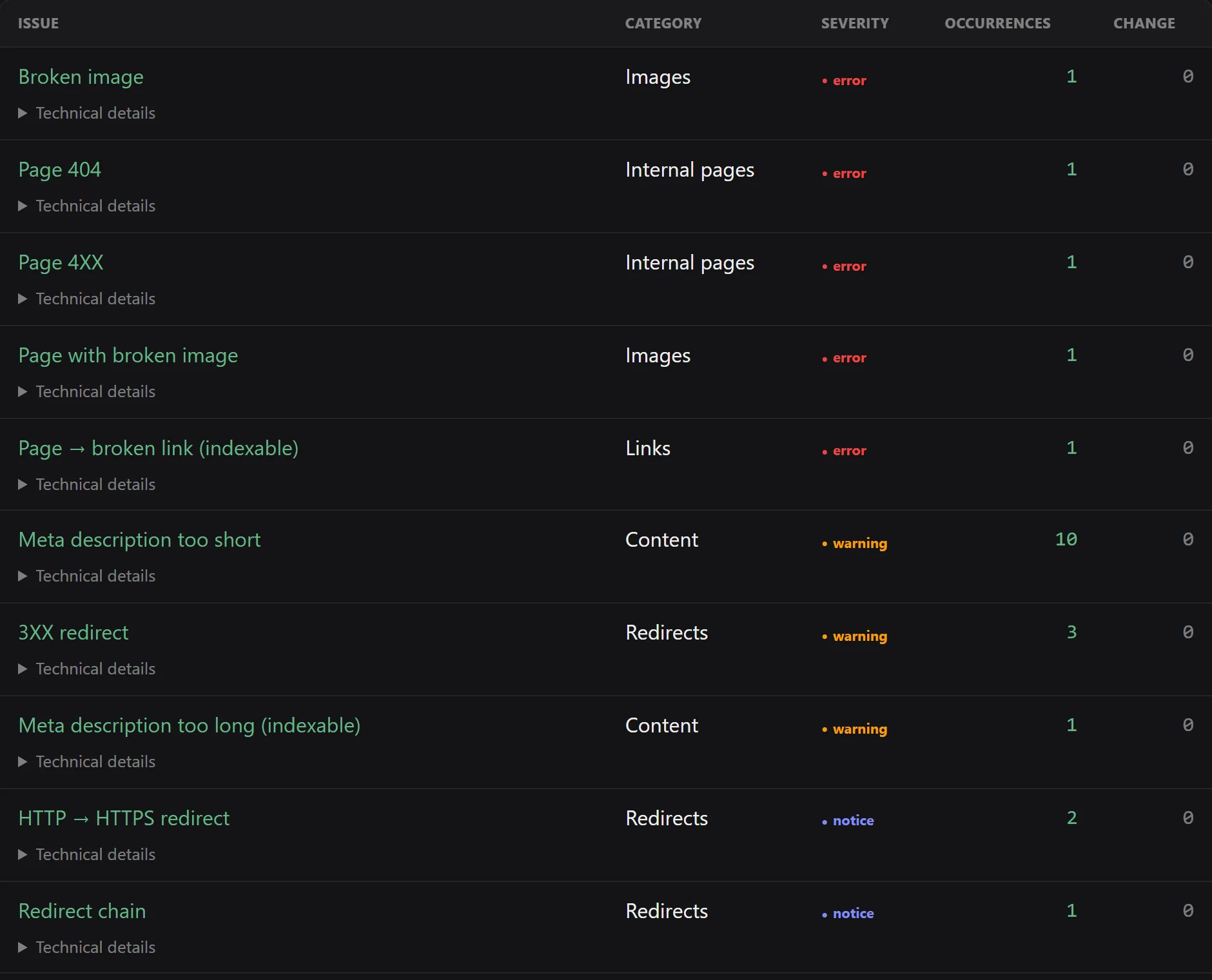
In this example, 10 pages have a meta description that is too short: you know which descriptions to review before preparing the fixes.
Open the full-size screenshotIs your website compatible?
The analysis covers the public pages our crawler can reach, within your plan's limits. Access to the code only comes later, for the fixes.
With WordPress (Yoast SEO), Ghost, PrestaShop, Wix and Webflow, Noyaru writes and saves SEO titles and meta descriptions after you review each text. On Shopify, Squarespace and Systeme.io, step-by-step instructions show where to make each change in your tool, and the new analysis checks the result. For other changes, from the Solo plan, an archive with the audit data and step-by-step instructions makes the work easier.
See compatible CMSs See how to fix without a GitHub repositoryFor the technologies below, Noyaru prepares the changes in a pull request: a proposed change that you or your developer review and approve before it goes live.
See how to connect the repositoryCode fixes — 10 technologies supported
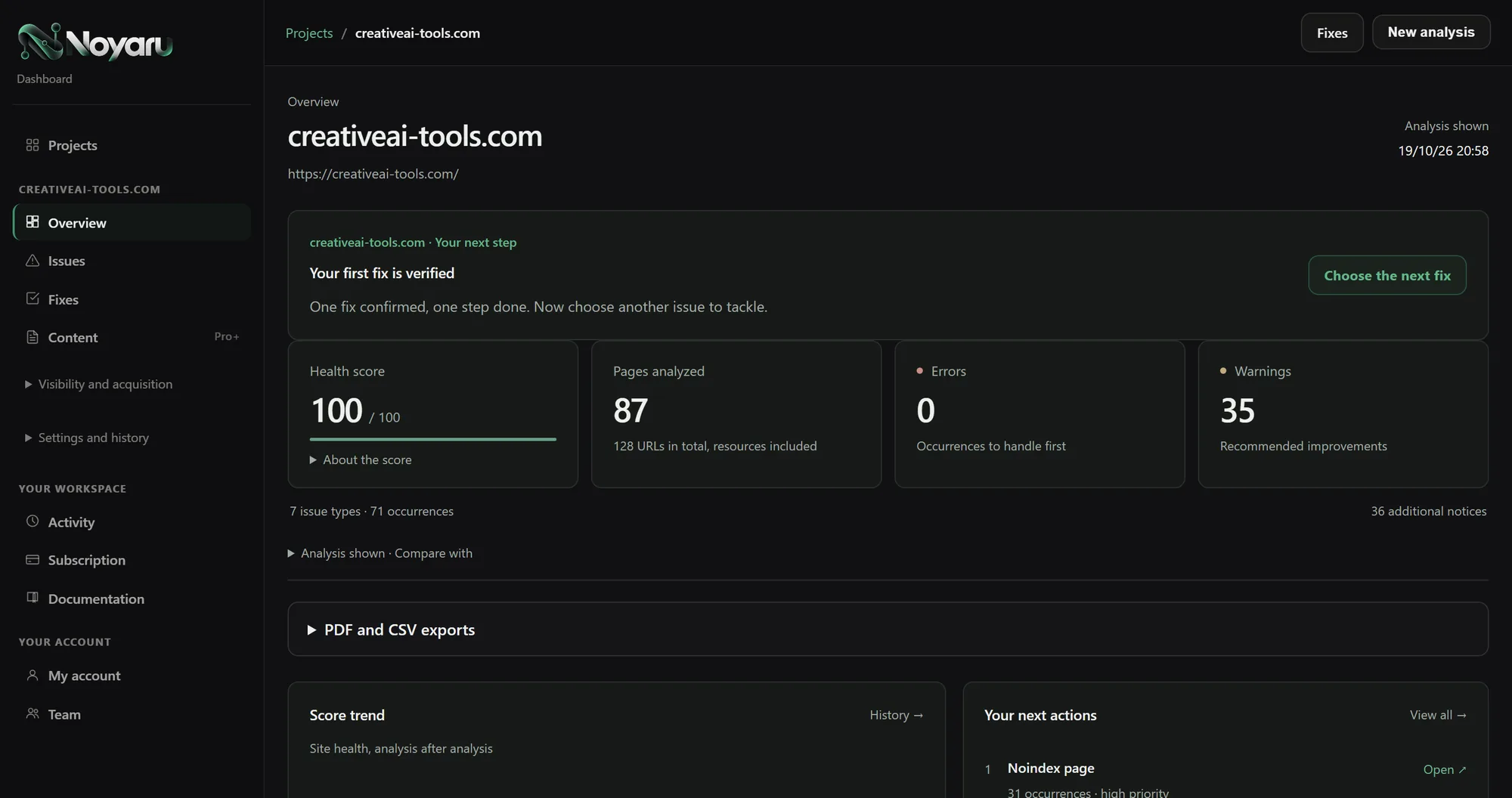
How it works
Create your free account, enter your website's address and start the analysis.
Review the detected issues and affected pages, with their severity and the estimated effort to fix them.
Review the proposed changes on your compatible repository or in your CMS (WordPress, Ghost, PrestaShop, Wix, Webflow), or send the report to your web provider so they can apply it in your tool.
Understand, fix, track
An audit to decide where to act, fixes prepared on compatible sites, and your search data to track progress.
Titles, broken links, redirects, indexing: find the affected pages and issues ranked by severity and effort.
Export the audit as PDF or CSV to work with whoever looks after your website.
The AI assistant helps you interpret your SEO and draft descriptions for your pages.
On a compatible repository, the fix arrives as a pull request. You or your developer review the changes before applying them.
Your CI pipeline checks that the site still builds. The proposal stays in draft until those checks complete.
On WordPress with Yoast SEO, Ghost, PrestaShop, Wix and Webflow, have the titles and meta descriptions written for every page affected by an issue, review them on a single screen, then save them to your site. For everything else, from the Solo plan, an archive of data and templates can be handed to your web provider.
Connect Google Search Console or Bing Webmaster to track the searches that bring visitors to your website.
Once a proposed code fix is merged, the next audit checks whether the issue is gone.
Monitor your website over time and browse the analysis history, within your plan's limits.
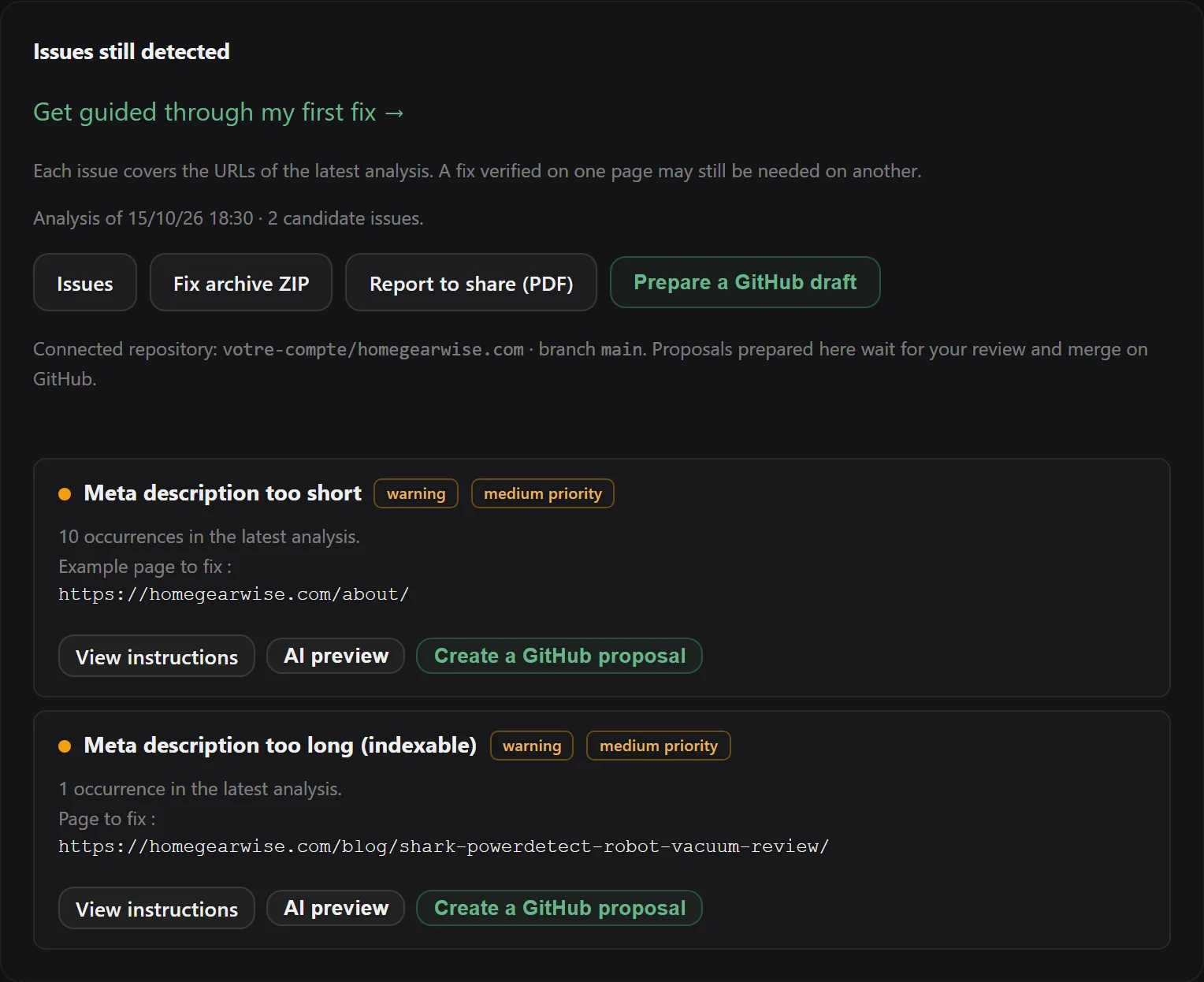
On a compatible repository, open the preview of the proposed change, then create a pull request to review. The screen shown here displays the commands available in the app.
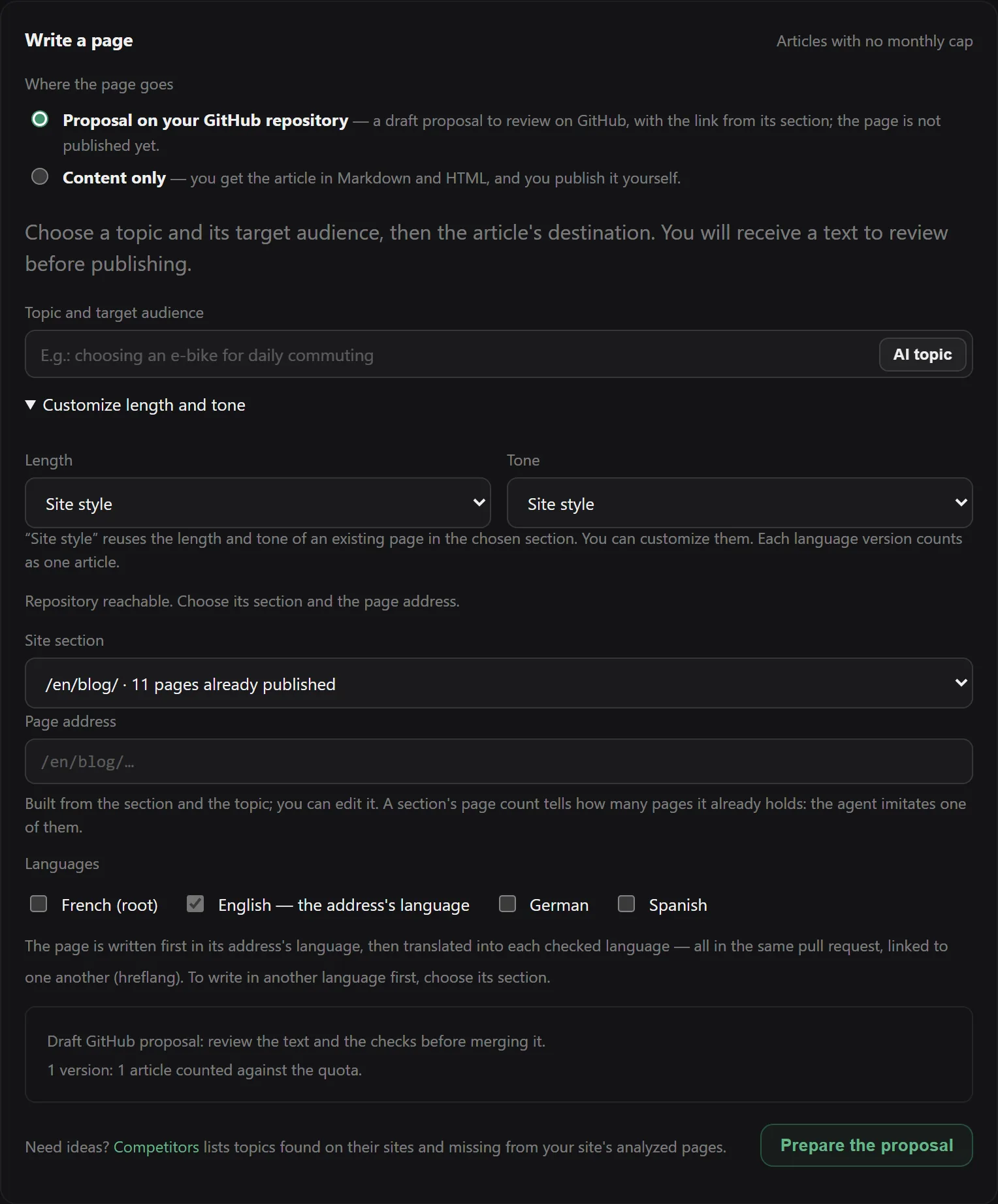
From the Pro plan: choose a topic, a length, a tone and a section. The page is delivered as a draft for review, in your repository or as Markdown and HTML.
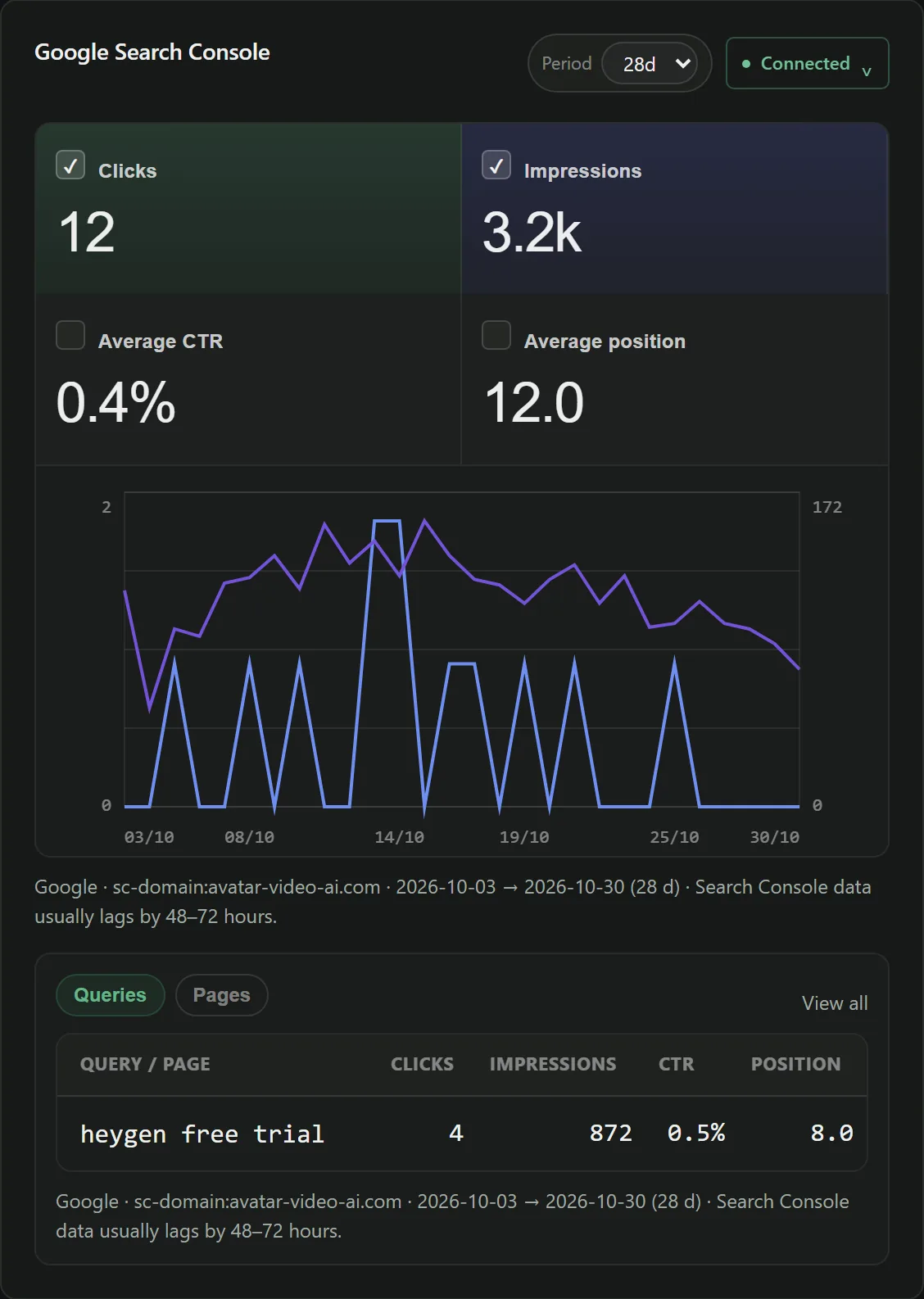
View your clicks, impressions and rankings over the chosen period to follow how your visibility changes.
Invite a consultant or a client; what they use is charged to your account, with a record of who did what.
Reports to share with a client or a team, with no manual formatting.
Encrypted secrets, and full account deletion at any time from your settings.
Pricing
Monthly, no commitment. Upgrades take effect immediately; downgrades take effect at the end of the paid period.
For a first audit and a trial of fixes on a compatible repository.
0 €no credit card
Start my free auditTo track your sites and prepare fixes every month.
49 €per month, incl. VAT
Start with SoloMultiple sites, competitors and content writing.
99 €per month, incl. VAT
Start with ProSite portfolios and agencies.
199 €per month, incl. VAT
Start with BusinessCode fixes require a compatible GitHub repository. An AI fix means one file changed by the model in GitHub, or one title or meta description proposed for a page in WordPress, Ghost, PrestaShop, Wix or Webflow. Understand the usage counts
| Feature | Free | Solo | Pro | Business |
|---|---|---|---|---|
| Audit | ||||
| Tracked sites | 1 | 3 | 10 | 30 |
| Pages analyzed per month | 800 | 20,000 | 100,000 | 300,000 |
| Pages per analysis | 1,500 | 3,000 | 6,000 | 13,000 |
| Core Web Vitalsmeasured by Google PageSpeed | 5 URLs per analysis | 15 URLs per analysis | 30 URLs per analysis | 50 URLs per analysis |
| Issues sorted by priority, with their URLs | Included | Included | Included | Included |
| Scheduled auditscounted against the page quota, like a manually started audit | Included | Included | Included | Included |
| CSV and PDF exports | Included | Included | Included | Included |
| Pull request fixes | ||||
| AI-written fixes per monthmechanical rewrites are not counted | 2 | 100 | 250 | 400 |
| Files per pull request | 2 | 12 | 20 | 40 |
| Fix engine | Standard | Standard | Standard | Standard |
| Checked by your CI before proposal | Included | Included | Included | Included |
| Verified after merge, at the next crawl | Included | Included | Included | Included |
| Fix pack without a Git repositoryfixes to apply by hand, redirects as CSV | — | Included | Included | Included |
| Content and competitors | ||||
| AI-written articles per monthone version per language | — | — | 4 | 12 |
| Automatic writing mode | — | — | Included | Included |
| Competitors analyzed100 pages read per competitor | — | — | 5 per site | 5 per site |
| Backlinks | ||||
| Inbound link inventoryCSV import, or Ahrefs sync | Included | Included | Included | Included |
| Opportunity searches per month | — | 30 | 80 | 300 |
| AI-written replies per month | — | 30 | 80 | 300 |
| Monitoring of earned links | — | Included | Included | Included |
| Performance | ||||
| Google Search Console and Bing Webmaster | Included | Included | Included | Included |
| Keyword opportunitiesdrawn from your Search Console | Included | Included | Included | Included |
| Team and assistant | ||||
| Invited collaborators | — | — | 2 | 5 |
| AI assistant messages per month | 30 | 400 | 500 | 1,000 |
Before you start
To run the audit and read the reports, a free account and your website's address are enough. Code fixes require a compatible GitHub repository and someone able to review the changes. You can hand this step to your developer. On WordPress with Yoast SEO, Ghost, PrestaShop, Wix and Webflow, titles and meta descriptions are fixed without a repository or code: you review each text before it is saved.
The audit only reads the accessible pages. In the pull request workflow, changes wait for your approval or your web provider's before being merged into the site. In WordPress, Ghost, PrestaShop, Wix and Webflow, nothing is saved until you have approved the preview.
1 tracked site, 800 pages analyzed per month and 2 AI fixes per month, on a compatible repository or in WordPress (Yoast SEO), Ghost, PrestaShop, Wix and Webflow. PDF and CSV reports are included. The archive of data and templates to apply without a repository is available from the Solo plan. See the full comparison for the other limits.
Each analysis uses pages from your monthly quota. The number of pages is limited by your settings, the per-analysis cap and the remaining monthly quota: the smallest applies. An AI fix is one file written by the model, even if that file serves several pages; in WordPress, Ghost, PrestaShop, Wix or Webflow, it is one title or meta description written for one page. Read the quota details.
You can send them the PDF and CSV reports. For a code fix, they can review the proposed changes on GitHub. Collaborator accounts are also available depending on the plan.
The audit shows the detected issues and a new run lets you verify the changes. How rankings evolve then depends on search engines recrawling your site, your content and your competitors. The service guarantees neither a timeframe nor a position in Google.
Guides
Prioritizing an audit, reading Search Console, recovering from a regression — and the product, screen by screen.
These guides are currently written in French.
Why the gap between an audit and a fixed site is the real problem in technical SEO, and what a fix delivered as a pull request looks like.
A method for turning a crawl with 230 alerts into a workable action plan: what to fix now, what to keep an eye on, and what to ignore.
Combine Search Console data with a technical crawl to decide which pages to optimize, instead of fixing things in the order a report lists them.
Create your free account, add your website's address and discover which issues to tackle first. No credit card.