
Technical SEO audit: the checklist for prioritizing fixes
A method for turning a crawl with 230 alerts into a workable action plan: what to fix now, what to keep an eye on, and what to ignore.
A crawl of 800 URLs surfaces 230 alerts. The wrong reflex is to work through them in the order they're displayed. The right one is to realize that those 230 rows may be hiding just a dozen causes.
Here's the method I use, in order.
1. Start with indexability, always
As long as a page can't be indexed, any work done on it is wasted. Rewriting a
title on a noindex page is like repainting a walled-up room.
In order:
- HTTP status codes. Do the pages that matter return a 200?
robots.txt. Is it blocking anything important, often a leftover from a staging environment?meta robotsandX-Robots-Tag. Anoindexforgotten after a redesign is a classic.canonical. Does it point to the page itself, or somewhere else?- Redirects. Chains, loops, and internal links that point to a redirect instead of the final destination.
The symptom that should set off alarm bells: a large gap between crawled pages and indexable pages.
2. Group by cause, not by row
This is the step most audits skip, and it's the one that cuts the work tenfold.
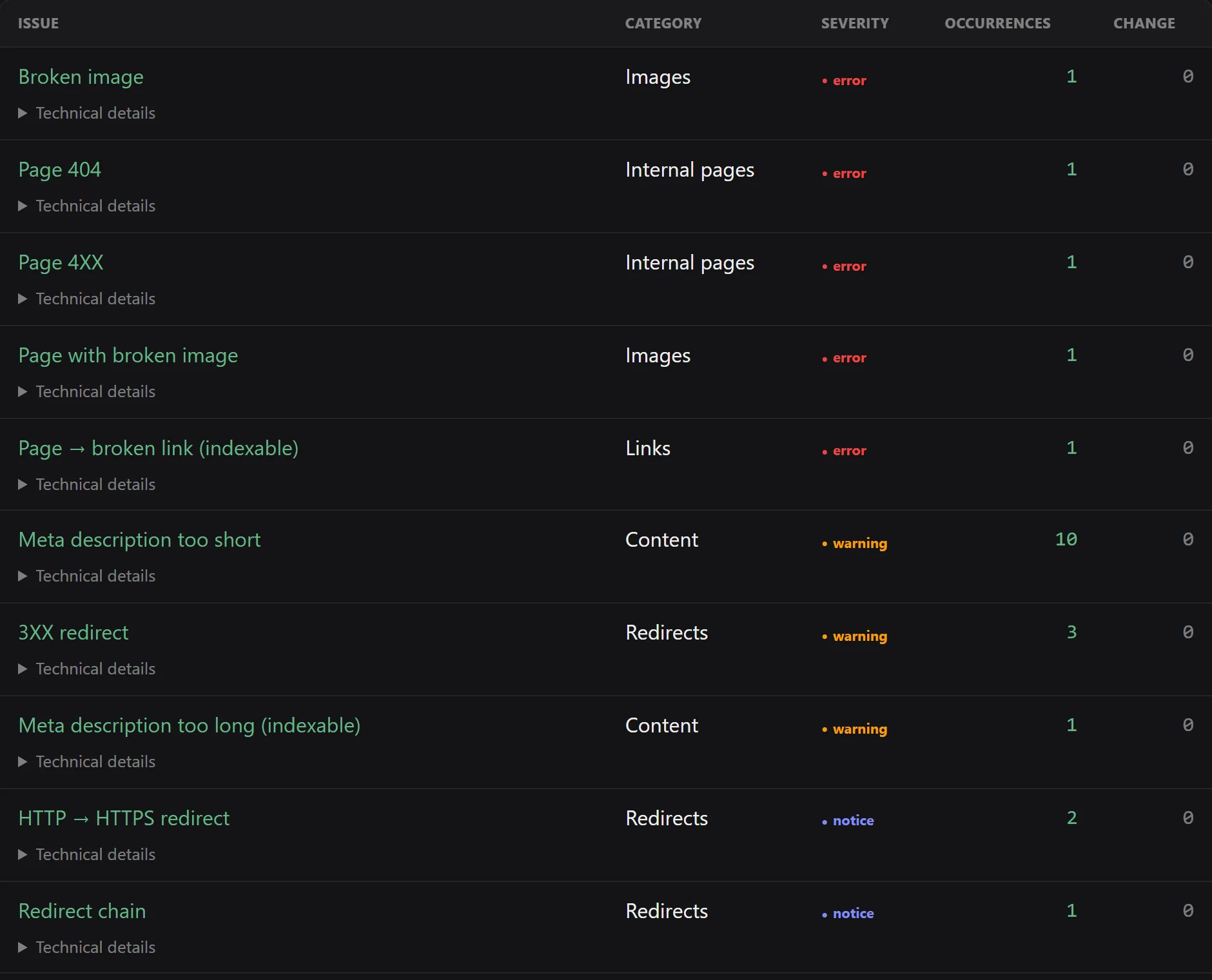
120 missing meta description tags is almost never 120 problems. It's one template that
doesn't output the tag. One change, 120 rows gone.
Ask this question for every high-volume issue: is it the page or the template?
- Every page of the same type is affected → template.
- A few scattered pages → content, to handle case by case.
This distinction completely changes the effort estimate. An audit that announces “230 fixes” without having made it is announcing a false number.
3. Cross-reference with what pays off
This is the most discriminating filter, and it requires Google Search Console.
A missing meta description on a page with 12,000 impressions and the same one on a 2019
archive page with zero impressions don't deserve the same day of work. Without search data,
you can only sort by technical severity — which amounts to treating them
both the same.
Export your pages with their impressions, cross-reference them with the list of issues, and you get your real work order.
4. Sort into four buckets
| Bucket | Contents | When |
|---|---|---|
| Critical | Non-indexable business pages, 5xx errors, inconsistent canonical, 404s on linked pages | This week |
| Important | Duplicate titles on pages with impressions, missing h1s, broken internal links, excessive click depth | This month |
| Watch | Missing descriptions on secondary pages, images without alt text, long URLs | Next batch |
| Ignored | Alerts on pages that are deliberately excluded or have no potential at all | Never, and that's a decision |
The fourth bucket matters most for the team's sanity. Deciding not to fix something is a legitimate decision — as long as it's written down.
5. Verify, which means recrawling
A deployed fix is not a confirmed fix. In between, there's a deployment, a cache, sometimes a CDN, and the assumption that the patch was the right one.
Run a new crawl after each batch and compare it with the previous one. Two numbers to look at:
- Have the targeted issues disappeared?
- How many new issues have appeared?
The second number is the one people forget. A canonical fix that resolves 40 URLs and
pushes 12 into noindex is a failure, even if the overall report improved.
6. Write the report for its reader
A raw export is not a report. If someone has to decide on a budget based on your work, they need:
- a five-line summary;
- the critical issues with the affected URLs;
- an honest estimate of impact and effort, including when the effort is low;
- what has been fixed since last time, with proof.
That last point is what turns a one-off audit into a recurring engagement. It's also the only one most tools don't produce on their own, because it requires keeping a record of previous fixes.
The checklist, in short
- Export the indexable pages and compare them with the crawled pages.
- Identify non-200 status codes on the pages that matter.
- Group each high-volume issue by cause: template or page.
- Cross-reference with Search Console impressions.
- Sort into critical / important / watch / ignored.
- Fix in batches, deploy, recrawl, compare.
- Write down what was done and what's left.
Frequently asked questions
What's the difference between an SEO crawl and an SEO audit?
The crawl collects the facts: HTTP status codes, tags, links, canonicals, depth, indexability. The audit interprets those facts to decide what to fix first. A tool produces the former; the latter requires knowing the business.
Should you fix every alert in an SEO audit?
No, and trying to is the surest way to finish nothing. Handle what prevents indexing, what hurts crawling, and what affects the pages that earn money. The rest waits for the next pass.
How long does a technical SEO audit take?
The crawl: anywhere from a few minutes to a few hours. The interpretation: half a day for a brochure site, several days for a product catalog. It's the interpretation that costs, not the data collection.
When should you recrawl after a fix?
As soon as a batch of fixes is deployed. It's the only way to confirm that the problems are gone and that no regression crept in along the way.
Put this guide into practice
In Noyaru, this prioritization is the default sort on the Issues page — and template fixes are triggered in one click, as a pull request on your repository.
Create a free account View the documentation