
Automate audits and fixes
Run crawls without having to think about them, fix every error in a single pull request, and track a project's fix tasks.
A one-off audit gives you a snapshot. A routine shows the trends — and above all, it catches regressions within days of the deployment that introduced them, rather than six months later.
The Activity screen
Activity, in the sidebar, gathers your sites' recent tasks and the ones still running: site analyses, multi-site audits and other tasks. It is not a complete history. The Site, Type and Status filters apply to this list.
View tracking opens a task's details: its status, its progress and, under Technical details and logs, its logs. The actions are on this tracking page:
- Request a stop — stops a running task once its current step is finished.
- Request a new analysis — after a failure or a stop, creates a new request, which counts toward the quota of the account that manages the site. Useful after a network outage or when the site was temporarily unavailable.
This is the screen to open when something seems stuck. An analysis that has been "In progress" for three hours on a 40-page site has a problem, and its logs name it.
Run crawls regularly
A periodic crawl is what makes the rest of the product useful:
- fix verification needs a crawl run after the deployment to confirm anything;
- the comparison between two crawls only exists if there are two crawls;
- a regression introduced by a release is only seen if someone is looking.
The schedules that work, by type of site:
| Site type | Schedule | Why |
|---|---|---|
| Stable brochure site | Monthly | Few changes between two crawls |
| Active blog | Every 2 weeks | Each new post can introduce a template issue |
| E-commerce | Weekly | Changing catalog, removed products, facets |
| Redesign in progress | After each release | That is when regressions happen |
The crawl that matters most
The one that follows a release. A redesign that adds 40 issues is a regression, even if the site looks perfect in the browser.
Fix in bulk
A project's Automation page, Bulk fix block: the Prepare a GitHub draft button.
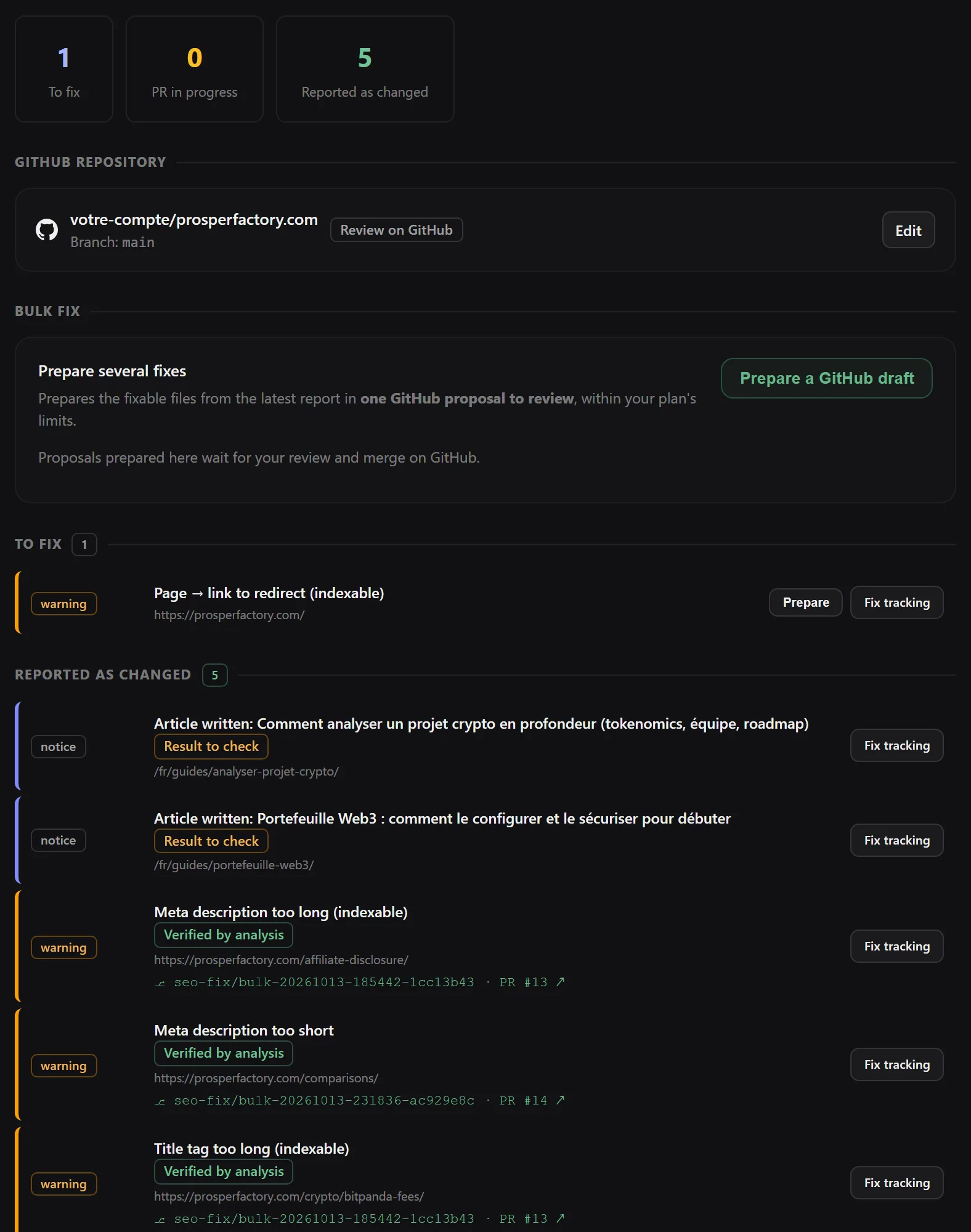
Noyaru takes the latest report, generates the fixes for each fixable issue, and pushes them all into a single pull request.
In Review mode, the PR waits for you. In Full Access mode, deterministic fixes are merged automatically, and the others stay open — see Connect GitHub.
The same page shows the project's fix task board, split into four groups: in progress, to fix, reported as changed, ignored. Each task comes with its associated pull request and the result of the post-crawl verification.
Two limits to be aware of: the bulk fix is capped at five runs per hour, and the number of files a single fix can modify depends on your plan.
Automate backlink research
Configurable per project, off by default: keywords to watch, sources, daily or weekly frequency, maximum number of finds per run, and whether drafts are written automatically.
Leave it off until you have checked by hand that the opportunities it surfaces are relevant to your site.
What automation does not replace
It runs the crawls, prepares the fixes, verifies the results and flags regressions.
It does not decide which pages deserve your time, does not write your editorial strategy, and does not merge a pull request whose content comes from a model. Those three remain decisions for you to make.
Frequently asked questions
How often should you crawl a site?
A stable brochure site: once a month. A blog that publishes every week: every two weeks. An e-commerce site with a changing catalog: every week. And always after a major release, whatever the schedule.
Does an automatic crawl use up my page quota?
Yes, exactly like a crawl you start by hand. That is why the page limit per crawl is worth setting before you automate anything.
Can I cancel a task that is running?
Yes: open its tracking page in Activity, then “Request a stop”. The task finishes its current step before stopping. A stop does not guarantee that a partial report is available; previous reports remain available from the site.
Try Noyaru
Create a project, run a crawl and browse your first report. No credit card required.
Create a free account