
Write an article and prepare it for publishing
Write an article to review in HTML and Markdown or prepare a GitHub proposal; understand per-language quotas and the publishing steps.
Noyaru prepares a text for you to review, based on a topic and an existing section. Choose Content only to get Markdown and HTML that you publish yourself, or a draft GitHub proposal if the site's code is connected.
Where to find the screen
Content, in a project's menu, from the Pro plan up. Content only mode requires a site analysis so it knows the site's sections and pages. It works with your CMS, without a GitHub repository. GitHub proposal mode and automatic writing require a connected repository.
Write a page by hand
Choose the destination, the topic, its section, then the length, tone and languages if needed. The summary shows the number of versions and what they cost.
In Content only mode, review the isolated preview or the Markdown text, then copy or download the version you want. Copying does not publish the article: paste it into your CMS afterward and check the live page.
In both modes, the text is reviewed so that it reads like the work of a practitioner: the stock phrases of AI models ("in today's fast-paced world", "it's important to note", the conclusion that sums up what you just read) are spotted and their paragraphs rewritten, without touching links, images or figures. What remains — overly regular sentences, lists everywhere — is flagged in the review notes. This is quality work, not a promise to escape AI detectors, which are often wrong; Google judges how useful a page is, not how it was written.
Add visuals
In Content only mode, the Add visuals block enriches the article in two ways, which you can combine.
Your images: up to 6 images (JPEG, PNG or WebP, 10 MB at most each), with, if you like, a sentence about what each one shows. The model sees them, places them where they support the text and writes their alternative text in the article's language. They are resized to 1,600 pixels wide, converted to WebP and stripped of their metadata — including the GPS location of a phone photo.
Visuals added by Noyaru — 4 at most per article, and only where they help the reader:
| visual | what bounds it |
|---|---|
| Chart | it only shows figures written in the article or in the data you pasted; a figure missing from the text gets the chart removed. Without a source, it is labeled "Illustrative figures". |
| Screenshot | a page of your site, seen by the latest analysis, and only when the article talks about what it shows. Each language version shows the page in its own language when it exists. |
| AI illustration | a generated image, with no text, logo or identifiable real person, marked as AI-generated in its metadata. At most 4 per article, from the Business plan up. |
Visuals are included in the article: they do not count as additional articles. A visual that could not be produced is removed from the text, and a note says so — never a broken image in the delivered article.
The Download the article and its images (.zip) button gives each version as .md and .html, along with the images/ folder they refer to. Put that folder next to the article, or upload the images to your CMS and update their addresses.
In GitHub proposal mode, visuals are not available yet: we first need to know, repository by repository, where the site stores its images and how its pages insert them.
In GitHub proposal mode, also fill in an address. The address is suggested from the topic, and you
adjust it — the section (/blog, /guides, /ressources) is an editorial decision that
no one can make for you.
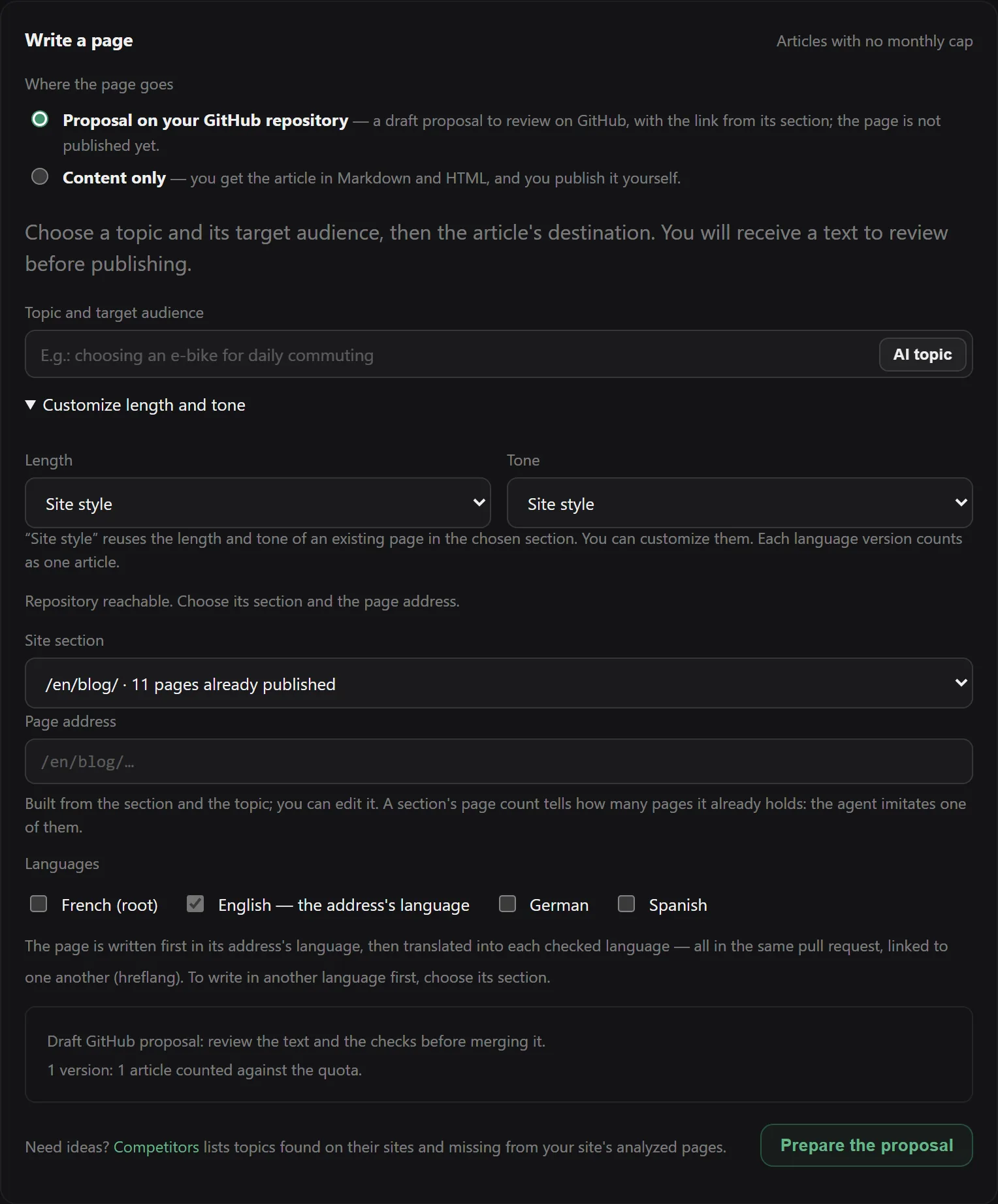
What happens next, in order:
- The agent reads your repository's tree and transposes the path of a sibling page — an existing page in the same section. It does not try to guess your generator's convention: it copies the one you already use.
- It reads that sibling page and has the new one written in the same form: same header keys, same language, same tags. A page missing a key that its siblings have is rejected, not published.
- It adds the entry to the section's index, by cloning a sibling's entry.
- It opens the pull request as a draft.
What the agent checks before writing
| check | what it rejects |
|---|---|
| Placement | a section with no existing page, or an address your site already serves |
| Header keys | a page that lacks the keys its siblings have — it would break your build |
| File review | an unbalanced file: braces, tags, front matter |
| Addresses | a canonical or an og:url that does not point to the page itself |
| Escaping | a backslash placed in markup text, where it would be displayed as is |
The last two exist because they actually happened: a model readily copies the
canonical of the page it is shown, and a green build cannot see an address that lies.
The link from the section
A page that nothing links to is an orphan, and your next crawl would flag it. The agent distinguishes three cases, and tells you which one applies in the body of the pull request:
- the index lists its pages by hand → the entry is added, cloned from a sibling's;
- the list is generated (a template that loops over the folder) → there is nothing to add;
- it doesn't know (ambiguous, unreadable or missing index) → the pull request opens anyway, stating plainly that the page is not linked from anywhere.
The proposed pages log, at the bottom of the screen, keeps this information: a row marked "to link by hand" flags a page whose entry still needs to be added.
Automatic mode
Off by default. To turn it on, you must name the section where the pages will go: no one will
review the address before the pull request, and /blog versus /guides cannot be guessed.
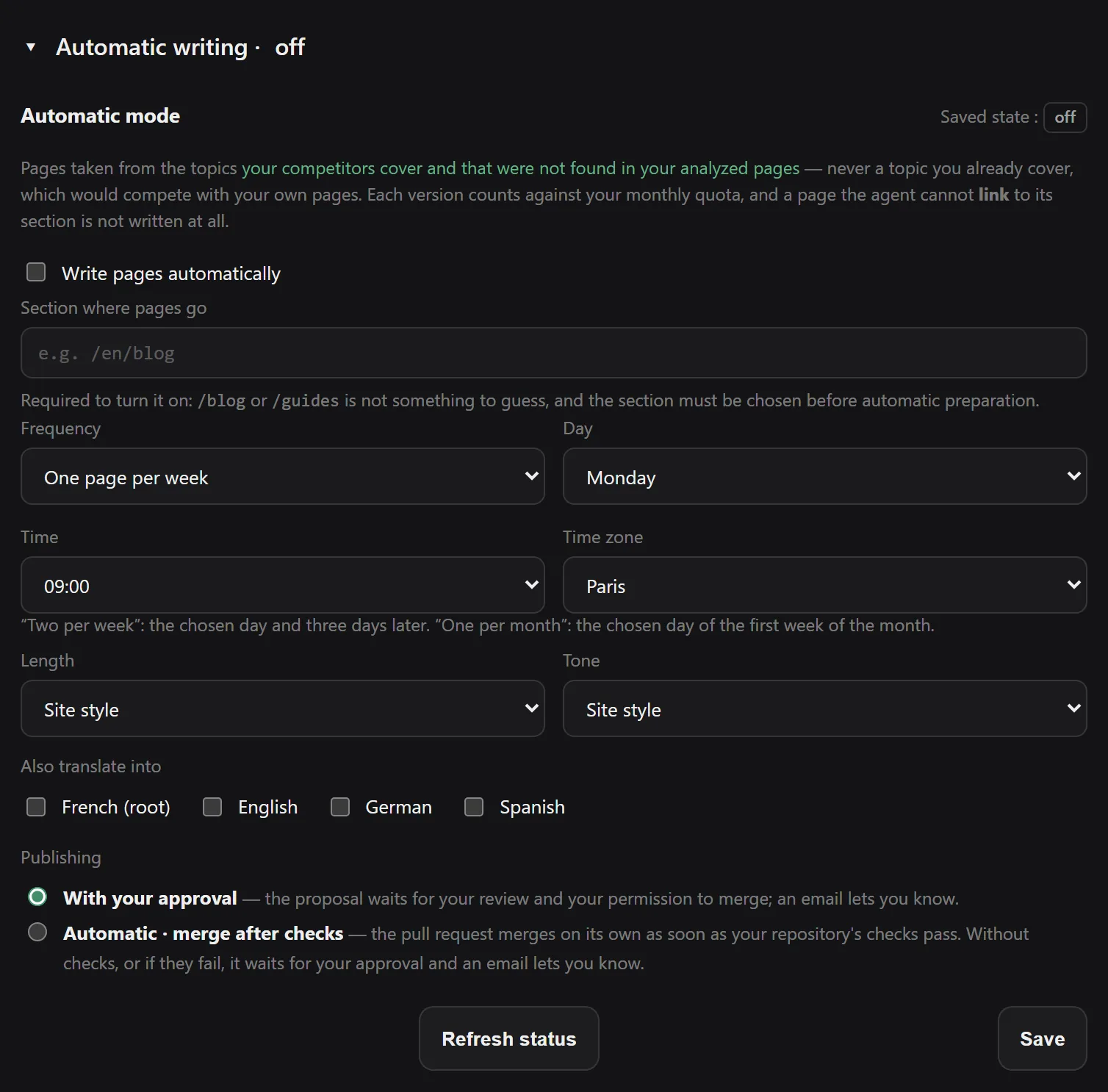
Writing follows your frequency, day, time and time zone, within the available quotas. It only prepares a page:
- on a topic that one of your competitors covers and that was not found in the analyzed pages of your site — see Analyze competitors;
- if a crawl of your own site exists, since otherwise every topic would look uncovered;
- on a topic never proposed before, even if you had closed its pull request;
- and only if it knows how to link the page. That is the only difference from manual mode: here no one will read the warning, so a page it cannot link is not written at all.
Publishing is set separately: With your approval, the proposal waits for your review and then your permission to merge; with Automatic · merge after checks, it can be merged once the repository's checks pass. If there are no usable checks, or if they fail, your approval is requested.
An approved proposal can therefore remain pending. A merged proposal is not proof that the page is live: that depends on your site's deployment.
An account whose plan has changed can always turn off the mode, whatever its plan.
What it costs
Each language version counts as one unit, regardless of the page's size and the number of files touched — the index modified along the way is not a second article. The counter is separate from the fixes counter: publishing two pages does not take away your fixes for the month.
| plan | articles per month |
|---|---|
| Free | — |
| Solo | — |
| Pro | 4 |
| Business | 12 |
These caps are deliberately low. Google's spam policy targets content produced at scale whose primary purpose is ranking, however it is produced. A generous cap would turn this feature into a way to harm the very site it is meant to serve.
What this page does not do
- Manual writing publishes nothing: you copy the content into your CMS, or review the draft GitHub proposal before it is merged. Automatic writing follows the explicit publishing setting described above.
- It does not check facts. Figures, names, dates, prices and sales promises must be checked before merging. The text is plausible; it is not verified.
- It does not write the first page of a section. Without a sibling page, your site's convention for that section does not exist yet, and the agent holds back rather than inventing one.
Once the page is merged, checking that a fix actually worked applies to it just as it does to everything else: the next crawl tells you whether it is really live, indexable and linked.
Frequently asked questions
Why is there no preview before the pull request?
Because the pull request IS the preview. It opens as a draft: you read the full diff, your repository's build gives its verdict, and nothing is published until you merge. A separate preview would either charge you for a discarded draft, or let pages be generated for free in a loop.
Can the agent write about a topic my site already covers?
Automatic mode picks topics that were not found in your analyzed pages. Check the scope of the analysis: a page may exist elsewhere on your site. When you enter the topic yourself, you choose it.
How many pages does the agent write on its own?
It depends on the frequency you choose: one page per month, every two weeks, every week or twice a week. Each language version counts toward the monthly quota of the account that manages the project.
What happens if the agent doesn't know where to put the page?
It refuses and tells you so. Creating a folder structure on your site based on a guess is worse than admitting it doesn't know. It needs at least one existing page in the same section to transpose its convention from.
Try Noyaru
Create a project, run a crawl and browse your first report. No credit card required.
Create a free account